
Cloud kitchen: building a channel that is yours
A cloud kitchen has no window, no sign and no passing trade. Everything depends on a channel, and by default that channel belongs to somebody else.
Home / Blog / Why the kitchen misses special requests, and how to stop it
"No onions" typed into a note box is one line for the whole order, easy to miss in a rush. Turn the request into a choice on the dish and it prints in bold right under that dish, on the kitchen screen and the kitchen ticket.
Anzul Aqeel · Founder & Director, Anunzio International FZC · 7 October 2026 · updated 16 October 2026
The kitchen misses special requests because they arrive as free text. A note typed at checkout is one line for the whole order. It reaches the managers' WhatsApp group and the kitchen ticket, but it is not tied to a dish, and in a rush a cook reads the dish lines first. Make the request a choice on the dish instead, and it prints in bold right under that dish.
Intouch Insight's 2026 drive-thru study found that special requests were the biggest cause of wrong orders: 43% of the inaccurate orders had a request made wrong. On delivery, a 2022 eduMe study found 63% of consumers had received at least one incorrect order since 2021, 24% had asked for a refund and 20% said they would not order from that restaurant again. And the way the order reaches the kitchen matters: a 2025 study of 340 independent restaurants found a 6.3% error rate on delivery orders typed in again by hand against 0.8% when they arrived straight into the system.
Free-text notes are one place these errors start. "No mayo" typed into a note box prints on the kitchen ticket, but not under the burger it is about.
GetMenu's checkout asks for a name and number first, then the building and unit number. It has one note box: "Notes for the restaurant (optional)". The note goes to your managers' WhatsApp group, on its own line under the dishes, and it also prints on the kitchen ticket. It is one note for the whole order, so it suits "call on arrival" or "leave at the gate" better than "no onions".
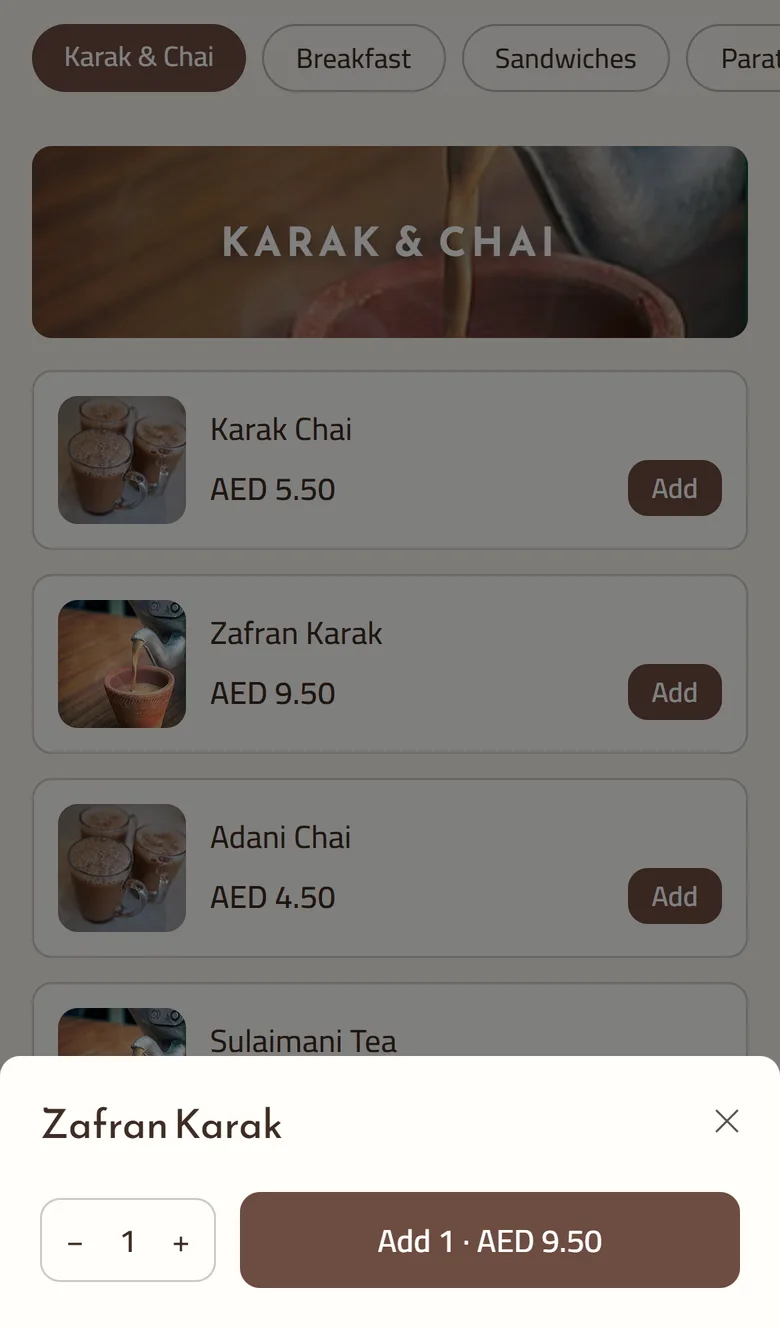
A cook reads each dish and its choices, so put the request there. On GetMenu every dish can carry choices and extras. Here is how to build them.
Now the request prints under the dish. On every plan, the managers' WhatsApp ticket lists each dish with its choices in brackets. With the POS add-on, the kitchen screen shows the dish name with its choices on the line under it in orange. The kitchen ticket prints per station, with no prices and a big order number. The spice level and the other choices are printed in bold on the kitchen ticket under the dish. Every order is on one kitchen ticket: counter, web and WhatsApp, as the page on the POS with online ordering shows. If you upload the whole menu from a spreadsheet instead of typing it, the choices go in one line per dish.
Every customer note prints on the kitchen ticket, but one kind is made to stand out. If the note mentions an allergy, the kitchen screen shows it in a bold red box above the dishes, and the kitchen ticket prints it in bold red above the dishes. On the Growth and Pro plans, a guest who orders from a table's QR code gets the same treatment. The table is the address, so there is nothing else to type.
A choice always sits under its own dish, on every ticket and screen. An order note goes to the managers' ticket, the kitchen ticket and the order's page in the dashboard, as one line for the whole order. At the counter and on the waiter's phone, a note for one dish, such as "less sugar", shows on the kitchen screen under the dish.
Read your order notes for a week. If the same request keeps coming back, make it a choice. The sales dashboard by day, item and channel shows which dishes sell most, so start with those.
The pricing page shows the plans and the POS add-on in your own currency, and every plan starts with a 15-day free trial.
Anzul Aqeel, the founder of GetMenu, spent four years reselling POS software and ran a cafe of his own before building GetMenu. "A bigger note never fixed a missed request. A question the customer has to answer before the order exists does."
Because the request arrives as free text for the whole order, not under the dish it is about, and in a rush a cook reads the dish lines first. A note is one extra line on the ticket. Make the request a choice on the dish, required if it matters, and it prints in bold under that dish every time.
A modifier, or a choice, is an option attached to a dish: a size, a topping, a cooking preference, "no onions". It can add a price, and it prints on the kitchen ticket with the dish. On GetMenu a choice group can be required and limit the picks, and the server checks it on every order.
As choices on the dish. You add a group such as "Extras" or "Spice level", give each choice a price if it costs more, and set Must pick and Max picks. The customer answers in the dish popup. The managers' WhatsApp ticket lists the choices, and with the POS add-on the kitchen screen and the printed ticket carry them under the dish.
Yes. The online checkout has one note box, "Notes for the restaurant". It goes to your managers' WhatsApp ticket, prints on the kitchen ticket and shows on the order's page. It is one note for the whole order, so it suits "call on arrival". A request about one dish, such as "no onions", works best as a choice, because it then prints in bold under that dish.
Yes. A note that mentions an allergy shows in a bold red box on the kitchen screen, prints in bold red above the dishes on the kitchen ticket, and reaches the managers' group too. On the Growth and Pro plans you can also declare allergens: mark what each dish contains from the list of fourteen, and the dish popup shows it.
A cloud kitchen has no window, no sign and no passing trade. Everything depends on a channel, and by default that channel belongs to somebody else.
A kitchen with no sign on the door has to be found some other way. This is what a delivery-only operation in Bahrain actually needs before the first order.