
Riders' group
DELIVERY A-412
Tower 4, unit 902 · map link · customer's phone · collect cash · 1 × Club sandwich · 2 × Karak tea · Delivered? Tap the link to confirm
Home/Delivery
DeliveryGetMenu is restaurant delivery software for buildings that have no clear name. At checkout, the customer shares a map pin, picks their building from your own list and types the unit number. Your riders' WhatsApp group gets all of it, with the customer's phone number. Phone orders typed in at the POS go to the riders the same way.
Many customers live in buildings with no name on the outside, or with a name nobody uses. Their address is a description, not a street and a number. The rider knows the area roughly and has to ask for the rest.
It usually starts in a WhatsApp chat. The customer sends a location pin to the restaurant. The manager forwards it to a rider between other jobs, and sometimes sends it again because the rider missed it. Then the calls start. The rider phones the customer to find the street, then again to ask about a landmark, such as a pharmacy or a gate. At the building, the rider phones a third time to ask for the floor and the unit number.
Each call takes a few minutes. The food gets cold, the next order waits at the counter, and the manager spends the evening passing on locations instead of running the kitchen. A customer who has to guide a lost rider by phone may not order again.
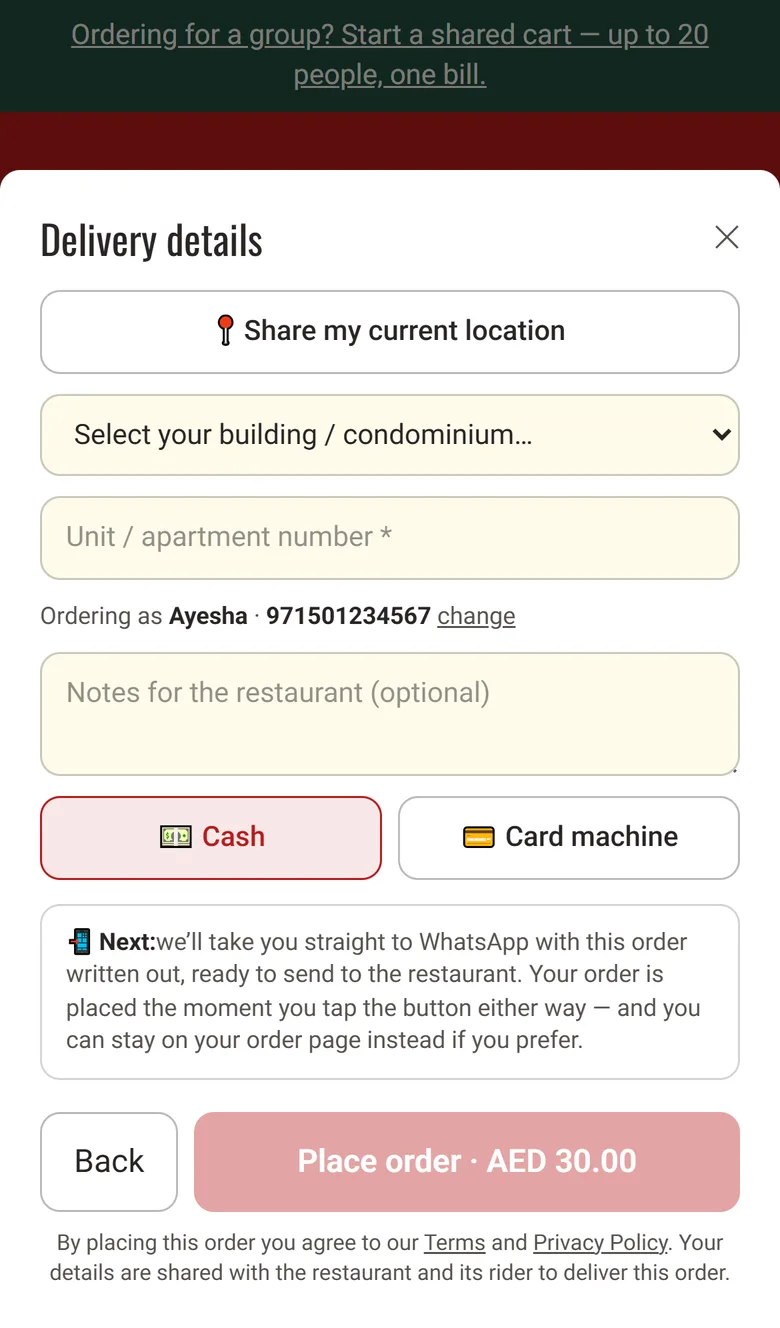
The customer gives the full address once, at checkout, before the kitchen starts cooking. They share a map pin in one tap, pick their building from your own list and type their unit number.
Your list holds every tower, housing complex or area you deliver to, named the way your riders know them. A customer cannot leave the building empty or choose one you do not serve. The Place order button stays grey until the unit number is filled in too.
The pin comes from the Share my current location button. The phone asks for permission, and the checkout saves a map link with the order. If the customer says no, or the signal is weak, the order still goes through with the building and the unit.
Nobody has to forward a pin to a rider, and the rider has less reason to phone the customer.
Your riders get each delivery in a WhatsApp group, on the phones they already carry. GetMenu has no rider app. For every delivery order, it sends a message with the delivery details to your riders' WhatsApp group. We call this message the ticket. It comes from your restaurant's own WhatsApp number. It all runs inside WhatsApp, so there is nothing new for your riders to learn.
There is no account to create. Your managers' group gets the full order the moment it is placed too, so the kitchen starts cooking while a rider gets ready. The riders' ticket shows:
DELIVERY A-412
Tower 4, unit 902 · map link · customer's phone · collect cash · 1 × Club sandwich · 2 × Karak tea · Delivered? Tap the link to confirm
Out for delivery
Your order A-412 is out for delivery. Please keep the cash ready. Your rider: Imran, with his phone number
Delivered
Order A-412 delivered. Enjoy your meal, and thank you for ordering from Noor Cafe & Bakery.
The ticket, then the customer's two updates
Pick the rider for each order from a list, on the orders board or on the POS. The customer's "on its way" message then gives the rider's name and phone number, so the customer knows who is coming.
If your riders work in teams, give each team its own WhatsApp group. When you choose a rider from a team, the ticket goes again to that team's group, and a note on screen names the group that got it. With no teams set up, every ticket stays in your main riders' group.
If you take orders for later, each one reaches the riders when it is time to cook, not when it was booked. You can also tick several orders and mark them delivered together. The customers' messages then go out one after another, not all at once.
Every change to riders and their groups is recorded, with who made it and when.
What the rider sees after tapping the link
Each building or area on your list carries its own flat delivery fee. You can also make delivery free once the cart reaches an amount you set.
The customer sees the fee next to the building name, and the total on the Place order button includes it. When free delivery is close, the cart shows how much more to add. Free delivery uses the cart total before any coupon. A coupon never makes the customer lose free delivery. You can also set a minimum order for delivery.
Fees go by building, not by distance or postal code. A list of buildings is quicker for customers to choose from, and easier for riders to learn.
Each building also has a place in the list, a switch to show or hide it at checkout, and a private note for your staff, such as a gate code. Hiding a building stops new orders to it at once. To add many buildings, import them from a spreadsheet. The import only adds new ones and never changes the fees you already set.

When a customer phones in a delivery order, your cashier types it in once at the POS and picks the building from the list your checkout uses. The riders' WhatsApp group then gets a ticket like an online order's.
The cashier adds the items with their choices, the unit number, the customer's phone number and whether the rider collects cash or brings the card machine. The order prints on the kitchen ticket, like every other order.
Choose the rider on the POS when the food is ready. The ticket goes out as for any other order.
Orders a customer sends in a WhatsApp chat are typed in this way too. Phone, chat and online orders all reach your riders in one format, so every ticket looks alike.
A phone order typed in at the POS
With the GetMenu POS add-on, delivery orders from your ordering page show on the POS screen, next to counter sales and the orders your cashier types in. Counter, web and WhatsApp orders share one screen and one kitchen ticket, so the cooks work from one list. When an order is ready, the cashier sends it to a rider from the same screen.
On the kitchen screen, each delivery order is marked Delivery. Each order changes colour as it waits, from green to amber to red, so the cooks can see which one is running late. Orders booked for later show as Later, with the time to start cooking.
You do not need the POS to deliver. The ticket in your managers' WhatsApp group has everything the kitchen needs to start cooking. So you can take delivery orders with only the ordering page and the two groups.
Kitchen ticket · A-415 · Delivery
Counter, web and WhatsApp orders on one ticket
Add every building or area you deliver to, each with its own delivery fee. You can import them from a spreadsheet.
Settings, then Condominiums & delivery fees
Choose the amount for free delivery, a minimum order, and the delivery time quoted to customers on WhatsApp and on their order page.
Settings, then Ordering rules
Link your restaurant's WhatsApp number by scanning a QR code. Then make a riders' group in WhatsApp, add your riders and choose the group here.
Settings, then WhatsApp connection & groups
Optional. Add each rider's name and WhatsApp number, and give each team its own group.
Settings, then Riders & dispatch groups
With the POS add-on, pair a tablet at the counter and a screen in the kitchen. Phone orders and the choice of rider then run from the counter.
Settings, then The POS
No. Riders get each delivery in a WhatsApp group, on the phone they already carry. They need no app and no login, which suits riders who change often. To finish a delivery, the rider taps the link in the ticket and presses Confirm delivered. The link works once, only for that order, and stops working after 12 hours or as soon as your staff mark the order delivered.
The order still goes through. Sharing the location is optional, but the building from your list and the unit number are required, so every ticket carries them. Only the map link is missing, and the customer's phone number is on the ticket if the rider needs to ask. Your riders also learn the buildings on your list, so they find them faster.
No. The checkout only offers the buildings on your list, and a delivery order cannot be placed without one. If customers keep asking for a building you serve, add it in your settings and it appears at checkout straight away. If you hide a building, new orders to it stop at once. The fees for your other buildings do not change.
No. GetMenu has no rider app and no live map of where your riders are. Instead, the customer gets a message when the order is on its way, with the rider's name and phone number, and another when it is delivered. Their order page shows the current status whenever they open it. On your orders board, you can see which orders are out for delivery.
Yes. Your cashier types the order in once at the POS, picks the customer's building from your list and adds the unit number and phone number. The riders' WhatsApp group gets a ticket like an online order's, with what to collect. Choose the rider on the POS, and the rider marks it delivered with the one-tap link.
The customer is told the order was cancelled, with the reason. The riders' group does not get a separate message, so tell the rider yourself. If the rider taps the delivery link anyway, the page says the order was cancelled and not to deliver it, and nothing changes. A link for an order that is already marked delivered shows a short notice and changes nothing.
The map link and the delivery notes are erased 120 days after the order, because they are only needed for the delivery itself. The customer's name, phone number, the order status and the money are kept, so your records and reports still add up. Old orders in your spreadsheet export then show an empty note and no map link, which is expected.
Try GetMenu free for 15 days, with no card needed. Add your buildings and their fees, pick your riders' WhatsApp group, and share your ordering page with your customers.