
How to take an online food order in Nigeria, step by step
Taking orders online is not one decision. It is five smaller ones, and most kitchens in Nigeria have already solved two of them without noticing.
Home / Blog / How to take restaurant orders on WhatsApp without typing them out
One person cannot answer 15 chats at eight in the evening. Instead, send customers to your ordering page, and the finished order arrives in WhatsApp for you, your managers and your riders.
Anzul Aqeel · Founder & Director, Anunzio International FZC · 7 October 2026
Taking orders by typing in a WhatsApp chat fails at dinner time. One person cannot answer 15 customers at eight in the evening, so dishes are forgotten and replies are slow. Here is how to take restaurant orders on WhatsApp instead: send customers to your own ordering page, and let the finished order arrive in WhatsApp by itself.
GetMenu sends it to the customer, your managers' group and your riders' group the moment the order is placed.
Chat is a poor way to write down an order. Replies get slow. Dishes are forgotten. When an order is written down wrong, the kitchen cooks it again and you lose the money.
Your customers are already there. TechCrunch reported Meta's own count of more than 3 billion monthly WhatsApp users in 2025. Zoko's guide to managing orders on WhatsApp Business says ordering inside the chat works for small sales but does not scale, and that typing orders by hand leads to mistakes.
WhatsApp ordering for restaurants works in six steps (see how GetMenu's WhatsApp ordering works).
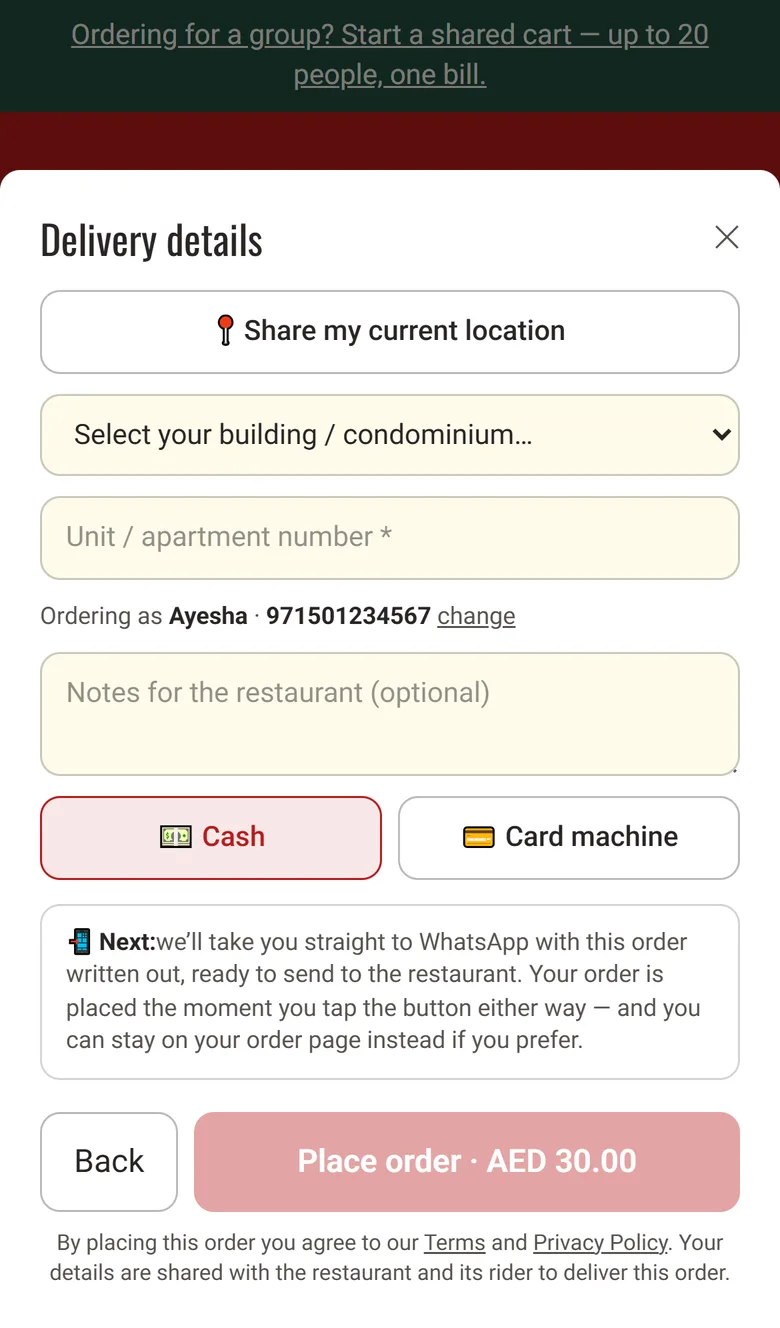
The customer gets a confirmation from your own number with the dishes, the total marked cash or card machine on delivery, the delivery estimate, and a link to follow the order. The managers' group gets the full ticket: every dish with its choices, the customer's note, the totals, the name, phone, building, unit and map pin.
The riders' group gets the dispatch: the building and unit, the pin as a map link, the customer's phone, and whether to collect cash or bring the card machine. A one-tap Delivered link in it works once, for 12 hours.
With the GetMenu POS add-on, online and WhatsApp orders also show on the POS screen beside counter sales. Every order prints on one kitchen ticket at each station: counter, web and WhatsApp. The customer's note prints on the ticket, and an allergy note prints in bold red above the dishes.
You can confirm each order by hand or let GetMenu confirm it after a set wait (5 minutes by default). The customer is told when it is on its way, with the rider's name and phone, and when it is delivered. On the Growth and Pro plans, every message sits in your message history.
Nothing changes for a first-time customer: the order is placed and the messages go. Their phone opens WhatsApp with the order written out, so the conversation is one they started, which keeps your number safe. The WhatsApp ordering page explains how GetMenu looks after your number.
GetMenu does not run a chatbot inside WhatsApp and does not use the paid WhatsApp Business API. The customer orders on the page, and WhatsApp carries the result from your own number, so there is no fee per message. Respond.io's pricing guide explains how the free WhatsApp Business app differs from the API, which charges per message. Our guide to WhatsApp Business for restaurants in Qatar covers the free app.
Anzul Aqeel, the founder of GetMenu, puts it simply: "Let the page take the order, and let WhatsApp carry it. The chat was never the right place to type a biryani."
After the order, the customer can download a PDF invoice from their order page without logging in, on every monthly plan. On the Pro plan, regulars also move up loyalty tiers with their own discounts, and get a loyalty card in Apple Wallet or Google Wallet that updates itself. There is no commission on your orders, and the trial runs 15 days with no card. See the plans.

Reply with the link to your ordering page, not a photo of the menu. Save the link as a quick reply in the WhatsApp Business app so one tap sends it, and the customer orders with the prices, the choices and their building list in front of them. If a customer still types the whole order in the chat, see how a typed-in order reaches the kitchen and the riders.
Put your menu on your GetMenu ordering page, link your WhatsApp number by scanning a QR code, and choose a managers' group and a riders' group. Then put the page link in your WhatsApp greeting, your status and on a card in every bag. From then on each order sends its own messages the moment it is placed. You can try it free for 15 days, with no card.
The WhatsApp Business app is free, with a profile, a catalog and quick replies. The WhatsApp Business API, which platforms use to send many automated messages, charges per message plus a platform fee. GetMenu sends from your own number without the API, so there is no fee per message on any plan (see the plans).
With GetMenu the confirmation goes out from your own number the moment the order is placed, with the dishes, the total marked cash or card machine on delivery, the delivery estimate and a link to follow the order. More messages follow when the order is confirmed, on its way with the rider's name, and delivered.
Their order goes out the moment it is placed, like any other. After checkout, WhatsApp opens on their phone with the order already written out, and they send it to you, so the chat starts from their side. That protects your number. If WhatsApp cannot reach them, the confirmation can go as a text from your own SIM, where that is set up.
Taking orders online is not one decision. It is five smaller ones, and most kitchens in Nigeria have already solved two of them without noticing.
There are two different questions hiding inside this search. One is which app to install. The other is how to take orders without one, which is the harder and more useful answer.